What Makes the Alien Text Effect Stand Out in Real-World Projects
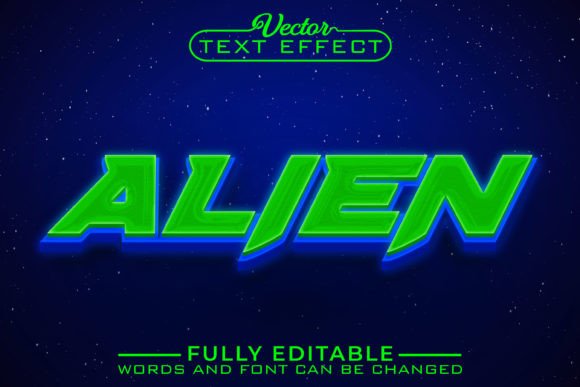
Text effects come and go, but certain styles have a way of sticking around because they simply work. The Alien Text Effect is one of those designs that catches attention without screaming for it. It blends a futuristic, slightly otherworldly feel with clean readability, making it surprisingly versatile. Whether you are designing a poster for a local event, creating social media graphics for a product launch, or putting together branding elements for a YouTube channel, the way your text looks can make or break the first impression. And when that text needs to feel bold, modern, and a little unconventional, this effect delivers.
What truly sets this apart from raster-based text styles is the fact that it comes as a vector design. For anyone who has ever tried to scale up a PNG or JPEG only to watch it turn into a blurry mess, the difference is immediate. You can take a design using this effect from a business card all the way up to a billboard without a single jagged edge or softened corner. That reliability matters when you are working across different formats and you do not have time to redo everything from scratch.
Where the Alien Text Effect Fits Into Real Creative Work
It is easy to assume that something with "alien" in the name belongs exclusively in sci-fi posters or gaming streams. But the reality is much broader. The Alien Text Effect has a structured, geometric quality that pairs well with modern branding, editorial layouts, and even product packaging. A small business selling handmade candles might use it for a limited-edition Halloween line. A fitness coach launching a high-intensity program could apply it to Instagram Story promotions to convey energy and transformation. The effect does not force a specific theme—it amplifies whatever mood you are already building toward.
Consider an educator creating digital resources for middle school students. Worksheets and slide decks can feel stale fast. Adding a headline in this effect to a unit about space exploration or technology instantly makes the material feel more engaging without distracting from the content itself. The same goes for a freelancer pitching a proposal deck to a tech startup. A well-placed title slide with the effect signals creativity and forward-thinking without going overboard.
Personal Projects That Benefit From a Polished Look
Not every use case revolves around clients and commerce. Plenty of people want their personal projects to look good simply because they care about the outcome. Someone planning a birthday party with a retro-futuristic theme might design custom invitations using the Alien Text Effect for the event name. A hobbyist creating custom T-shirts for a friend group could apply it to a catchy phrase and have it printed without worrying about resolution loss. Even something as simple as a personalized phone wallpaper or a desktop background gains a professional edge when the typography is sharp and intentionally styled.
Because the design is fully editable, these personal projects do not require advanced technical skills. You can change the text itself, adjust the word spacing, and modify the overall dimensions with minimal effort. For people who feel intimidated by graphic design software, this accessibility removes a major barrier. They are not wrestling with complicated tools just to get the words to sit right. Instead, they can focus on what they actually want to say.
How Different Users Apply the Effect Across Industries
The versatility of the Alien Text Effect becomes most apparent when you look at how various groups put it to work. The following examples reflect actual scenarios people encounter regularly.
- Social media managers frequently need to create quote graphics, announcement posts, and short-form video thumbnails. The effect gives text overlays a distinctive presence that stops thumbs from scrolling past.
- Print shop owners and merchandise creators value vector designs because they translate cleanly to physical products—mugs, hoodies, tote bags, and enamel pins all benefit from crisp text edges.
- Independent musicians and podcasters use the effect for album art, episode covers, and promotional flyers, especially when their content leans toward electronic, experimental, or alternative genres.
- Event organizers handling conventions, gaming tournaments, or themed pop-up markets find the style aligns naturally with promotional materials that need to feel exciting and slightly unconventional.
- Bloggers and newsletter creators incorporate the effect into featured images and email headers to add visual interest without cluttering the message.
When the Effect Shines in Commercial Settings
Small business owners often operate with limited design budgets. Hiring a professional for every visual asset is not always practical. Having access to an editable vector text effect means they can produce consistent, high-quality graphics across multiple touchpoints. A coffee shop running a seasonal campaign might use the effect on window decals, loyalty cards, and social media posts simultaneously. The brand stays recognizable, and the materials look cohesive because the text treatment remains identical regardless of size or medium.
Publishers of digital magazines and e-books face a similar need. Cover designs must grab attention in thumbnail size on crowded marketplace pages. The Alien Text Effect provides enough visual distinction to stand out while maintaining readability. And because vectors do not pixelate, the same design file works for both the tiny preview image and the full-bleed promotional banner on a website.
Editing Without the Learning Curve
One of the most practical aspects of this product is how approachable the editing process actually is. Many people delay starting creative projects because they assume they need to master complex software first. With this design, the core adjustments—changing the words, resizing elements, and tweaking the layout—are straightforward. You open the file, click on the text layer, and type what you need. The dimensions adjust proportionally, so you are not stuck with a fixed width or cramped letter spacing.
There is an honest distinction worth noting, though. While font, word, and dimension changes are beginner-friendly, color modifications do require some familiarity with the program you are using. If you have worked with vector software before and know how to select objects and apply fills or strokes, you will have no trouble. For someone opening Illustrator or Affinity Designer for the very first time, there might be a brief learning moment. But color is often the last decision in a design process, and many users find that the default palette works well enough to use immediately. Over time, as comfort with the software grows, experimenting with custom colors becomes second nature.
Realistic Scenarios Where Preparation Matters
Before you download or purchase a design like the Alien Text Effect, it helps to have a clear sense of where you plan to use it. This is not about limiting creativity—it is about making sure the files you receive align with your intended output. Some scenarios to consider:
- Print projects may require CMYK color profiles or specific file formats. Check whether the vector files provided include compatible versions for your workflow. The last thing you want is a color shift between screen and paper.
- Digital-only projects give you more flexibility, but you should still confirm that the effect renders cleanly on different screen sizes, especially if it will appear on mobile devices where small text can become illegible if not scaled properly.
- Collaboration with other designers or printers means you might need to share source files. Vector formats generally make this seamless, but communication about layers and editability prevents surprises down the line.
- Brand consistency matters when the effect becomes part of a larger visual identity. Consider how it pairs with existing fonts, logos, and color schemes before committing it to permanent materials.
Why Vector Quality Changes Everything
It is worth pausing on the vector aspect because it genuinely affects how people work. Imagine designing a flyer for a community fundraiser. You spend an hour getting the layout right, the text effect sits perfectly, and everything looks crisp on your screen. Then someone asks for a larger version to print as a poster, and another person wants to use a cropped section for an Instagram post. If your text effect were a raster image, each of these requests would mean either accepting a loss in quality or rebuilding from scratch. With a vector, you scale up, scale down, export at whatever resolution you need, and move on. No stress, no rushed fixes.
That reliability changes how people approach their work. They feel more confident saying yes to last-minute requests or adapting materials for unexpected formats. When the technical foundation is solid, creative decisions become the main focus instead of damage control.
Who Finds the Most Value in the Alien Text Effect
It would be easy to say "everyone," but the truth is more specific. People who regularly produce visual content and need consistency across platforms tend to benefit the most. A marketer running weekly campaigns knows the headache of maintaining visual quality under tight deadlines. A content creator juggling YouTube thumbnails, channel art, and merchandise designs appreciates having a reliable asset that does not degrade with each export. An educator developing a resource library values designs that remain sharp when printed at different sizes for classroom use versus digital distribution.
There is also a quieter group of users—people who simply enjoy making things. They might not have commercial goals or audience metrics. They create because it is satisfying, and having tools that do not frustrate them keeps that satisfaction intact. The Alien Text Effect fits into their workflow without demanding expertise they do not have and without punishing them for wanting to experiment.
Moving From Interest to Application
At some point, every design resource comes down to what you actually do with it. The most polished effect in the world means little if it sits unused in a downloads folder. What makes this particular text effect practical is how quickly you can see results. You open the file, replace the placeholder text with your own, adjust the sizing to fit your canvas, and you have something that looks intentional. For a small business owner preparing a sale announcement or a blogger updating a site header, that speed of execution matters more than an extensive feature list.
The Alien Text Effect is not trying to be everything at once. It does a specific thing well—giving text a futuristic, dimensional look that holds up at any size—and leaves the rest to you. That focused utility is what turns a one-time download into a repeat-use resource across months of projects, campaigns, and creative explorations.