Pog Luck: Energize Your Designs with a Full-Color Gaming Display Font
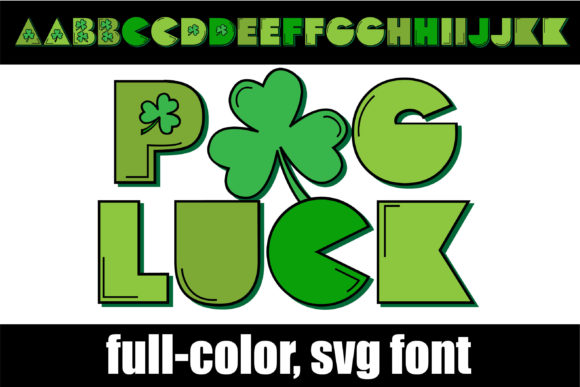
Finding the right display font can make or break a creative project. When you need lettering that grabs attention instantly, the standard solid-color typefaces often fall short. Pog Luck steps into that gap with something genuinely different: a full-color SVG font built around gaming-style lettering, complete with highlights, shadows, and shamrock details that bring every character to life before you even adjust a single setting.
This article explores what Pog Luck offers, who it serves best, and how to put it to work across different design environments. Whether you are crafting merchandise, event graphics, social media content, or branded packaging, understanding how this font behaves and where it performs best will help you decide if it fits your next project.
The Real Design Challenge Pog Luck Addresses
Many designers spend significant time layering effects onto type. Adding a highlight, building a shadow, or creating a dimensional look usually involves multiple steps in illustration software. For quick-turn projects, that process eats into deadlines. For beginners, it creates a steep learning curve. Even experienced designers sometimes want a ready-made solution that does not compromise on visual impact.
Pog Luck directly addresses that friction. Because it is an OpenType full-color SVG font, every letter arrives with its highlights, shadows, and shamrock embellishments already built in. The lettering carries a playful, competitive energy often associated with gaming culture, esports branding, and St. Patrick's Day themed promotions. Instead of constructing effects from scratch, you type and see the finished look immediately in supported software.
This matters most when consistency across multiple words or headlines is critical. Manually adding highlights to each letter can introduce subtle variations. With Pog Luck, the treatment remains uniform whether you type five characters or fifty, saving time while maintaining a polished result.
Who Uses a Font Like Pog Luck and Why
Different creative professionals approach a gaming-style color font from different angles. Understanding these perspectives helps clarify where Pog Luck fits into a workflow.
Print-on-demand sellers and merchandise designers often need bold, themed type that looks complete without extensive editing. A shamrock-accented gaming font works for seasonal St. Patrick's Day apparel, esports team fan merchandise, or novelty items where visual punch drives sales. The pre-colored lettering removes guesswork from the design process, which matters when producing high volumes of product mockups.
Event organizers and promotional designers look for type that communicates energy. Tournament brackets, party invitations, pub crawl flyers, and charity run signage all benefit from lettering that feels celebratory and competitive at the same time. Pog Luck delivers that mood without requiring the organizer to master advanced typography techniques.
Social media content creators work against tight timelines. A font that instantly adds dimension and color to a quote graphic or announcement post reduces the steps between concept and publish. The gaming aesthetic also taps into a visual language that online audiences recognize quickly, which can improve engagement on platforms where scroll-stopping imagery matters.
Hobbyist crafters using cutting machines represent another significant user group. Programs like Silhouette Studio support full-color SVG fonts, meaning Pog Luck can appear in its intended colorful form on screen before cutting or printing. For layered vinyl projects, printed decals, or custom card designs, having the colors mapped out by the font itself clarifies the creative vision from the first moment.
Practical Applications Where Pog Luck Excels
The visual makeup of Pog Luck pushes it toward specific use cases. The gaming-style lettering suggests movement and competition. The shamrock element ties it to Irish-themed events, luck-based branding, or any project where fortune and chance play a thematic role. Here are several real-world scenarios where the font fits naturally.
Esports and gaming team graphics. Whether for a local tournament, a streaming overlay, or team jersey mockups, Pog Luck brings a competitive edge to player names and event titles. The built-in highlights and shadows give the lettering a three-dimensional feel that mimics the polished look of professional gaming broadcasts.
St. Patrick's Day campaigns. Bars, restaurants, and retail shops running March promotions can use Pog Luck for window signage, social posts, and printed menus. The shamrock details reinforce the holiday without requiring separate illustration work.
Lottery and raffle event materials. Any event built around luck as a theme pairs well with this font. Charity galas, school fundraisers, and casino night parties can use Pog Luck on tickets, banners, and table signage to carry the theme through every touchpoint.
Novelty product packaging. Small-batch beverage labels, limited-run snack packaging, or themed gift boxes benefit from display type that feels custom-made. Pog Luck provides that bespoke quality without the cost of commissioning a custom lettering artist.
Installation and Compatibility: What to Expect with a Full-Color SVG Font
Pog Luck installs like any standard .otf font file. On a Mac, this typically happens through FontBook. On Windows, users can install via the Control Panel or a preferred font manager. The process itself is straightforward and familiar to anyone who has added fonts to their system before.
However, color fonts carry a specific behavior worth understanding upfront. In non-compatible programs, Pog Luck will display as black. This often surprises first-time color font users. The font preview window in some compatible applications may also show the lettering in black when browsing the font list. The real test comes when you actually type onto the document. If the software supports full-color SVG fonts, the typed text appears with its intended highlights, shadows, and shamrock coloring.
Several widely used design applications support SVG color fonts at this time. Adobe products, including Photoshop, Illustrator, and InDesign, handle them well in recent versions. Silhouette Studio offers compatibility for crafters. QuarkXPress supports them for publishing workflows. Inkscape, the open-source vector editor, also works with full-color SVG fonts. Checking your specific software version remains advisable, as support continues to improve across the industry.
When working in a program that does not support color fonts, designers sometimes use Pog Luck as a reference layer, tracing or rebuilding the lettering using the black preview as a guide. While this adds steps, it also opens creative possibilities for custom color variations beyond what the font provides natively.
Getting the Most from Pog Luck in Your Projects
To use Pog Luck effectively, start by confirming your target software supports OpenType SVG color fonts before purchasing or downloading. Open a test document and type a few characters. If the color appears, you are set to proceed. If it stays black, you may need to explore alternative software for that project or adapt your approach.
Consider pairing Pog Luck with simpler sans-serif fonts for body copy. The gaming-style lettering works best as a display element; headlines, titles, and short phrases, rather than long paragraphs. A clean supporting typeface keeps layouts readable while letting Pog Luck carry the visual weight where it belongs.
Pay attention to background contrast. The built-in highlights and shadows in Pog Luck interact with the canvas behind them. Dark backgrounds often make the highlights pop more dramatically. Light backgrounds can soften the effect. Testing both options before finalizing a design helps you choose the direction that suits your message.
For print projects, confirm that your export settings preserve the color information. Saving as a PDF from compatible software typically maintains the SVG color data. Sending the file to a professional printer with notes about the color font usage can prevent unexpected output issues.
Why a Font Like Pog Luck Matters for Creative Efficiency
Time remains one of the most limited resources in any creative field. Fonts that combine aesthetic quality with built-in effects reduce the gap between idea and execution. Pog Luck does not replace the need for skilled design work, but it removes repetitive tasks that slow down production. Instead of adding highlights letter by letter, you type and move forward.
This efficiency extends beyond professionals. Hobbyists and small business owners who lack formal design training can still produce graphics that look carefully crafted. The font handles the heavy lifting on dimension and texture, letting the user focus on layout and message.
The shamrock element also gives Pog Luck a niche identity. While many gaming fonts exist, the integration of luck-themed iconography sets it apart. For the right project, that specificity becomes a strength rather than a limitation. A St. Patrick's Day esports event, for example, finds its perfect typographic match in a single file rather than cobbling together unrelated elements.
Common Questions About Working with Color Fonts
New users often wonder whether they can change the colors within Pog Luck. The short answer depends on the software. Some programs allow SVG font colors to be adjusted through appearance panels or fill settings. Others treat the font colors as fixed. If custom color control matters for your workflow, research how your preferred application handles SVG font color editing before committing to a design direction.
Another practical consideration involves file size and performance. Full-color SVG fonts contain more data than standard vector fonts because each character stores color and shading information. For most modern computers, this difference is negligible. On older systems or when working with extremely large documents, however, keeping an eye on performance helps avoid slowdowns during heavy editing sessions.
Licensing also deserves attention. Commercial use of fonts often requires specific licenses depending on whether the type appears on products for sale, in broadcast content, or within digital applications. Review the foundry's license terms to ensure your intended use of Pog Luck aligns with what the license permits.
Who Should Consider Adding Pog Luck to Their Toolkit
Pog Luck suits designers and creators who regularly work on themed projects with a playful or competitive tone. If your calendar includes St. Patrick's Day promotions, gaming events, or luck-based marketing campaigns every year, having a dedicated font for those occasions saves repeated effort. The investment pays off in faster turnaround times and consistent visual quality across multiple deliverables.
For occasional use, the font still holds value if you want a distinctive display option that does not require building effects from scratch. The one-time setup of installing Pog Luck gives you immediate access to colorful, dimensional lettering whenever the need arises.
Ultimately, Pog Luck represents a specific solution for a specific creative need. It delivers gaming energy, shamrock charm, and full-color complexity in a single file. When your project calls for exactly that combination, no amount of manual effect work quite matches the convenience of typing and seeing the finished result appear instantly on the page.