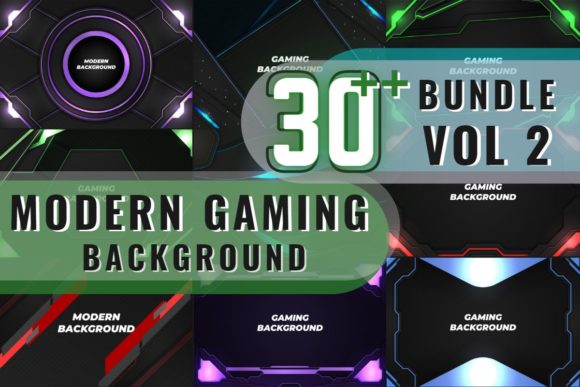
Modern Gaming Background Bundle Vol 1: Turn Text into Action
If you design any kind of content around video games, esports, or streaming, you already know how hard it can be to get the look right without spending hours tweaking layer effects. That's where the Modern Gaming Background Bundle Vol 1 changes the workflow. It isn't a single font or a static background — it's a collection of 30 fully editable text and shape styles built inside Adobe Illustrator. Every file arrives as an AI and EPS, so you can open it, click on a word, type your own copy, and immediately see a high-impact gaming aesthetic come alive. No manual layer styles, no endless YouTube tutorials, just one click and the effect maps across whatever you typed.
What makes this bundle feel different from a typical asset pack is how coherent the visual personality stays across all 30 options. The styles lean into modern gaming territory: think neon-charged outlines, metallic textures, sci-fi glows, arcade-era gradients, and battle-worn industrial finishes. Some effects push a fast-paced futuristic vibe with sharp bevels and electric blue highlights, while others pull back into sleek carbon fiber or brushed steel looks that would sit just as comfortably on a hardware brand site. Because each style lives as an editable appearance inside Illustrator, you can apply it to any font you already own, any logo mark, or even a compound path you've drawn yourself. The flexibility means you aren't locked into a specific typeface — you pick a font that matches your brand voice, then dress it with the bundle's pre-built effects.
When Backgrounds Aren't Just Backgrounds
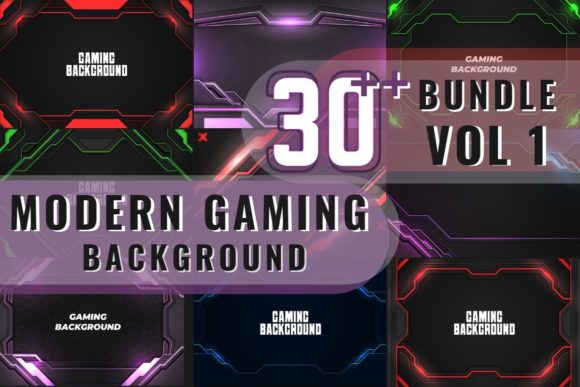
Despite the name, the Modern Gaming Background Bundle Vol 1 works best when you think of it as a complete text-effect system, not merely a backdrop. That said, the pack does include high-resolution preview images in JPG format that can serve as social media backgrounds, stream overlays, or placeholder textures. It's the combination of both — the applied text styles plus those rich, gaming-centric base images — that gives you a full visual suite for one project after another.
In practical terms, you might start a Twitch panel design by placing one of the JPG backgrounds, then adding your channel name in a heavy sans serif headline wearing one of the more aggressive chrome or plasma effects. Because the styles are 100% editable and resolution-independent, you can scale the result up for a large banner or down for a mobile-first Instagram story without losing crispness. The same visual language can travel from your YouTube end screen to your Twitter header, creating a consistent look that viewers start recognizing instantly.
Real-World Places the Bundle Shines
Over the past few months, many designers have found the Modern Gaming Background Bundle Vol 1 fitting naturally into projects that sit at the intersection of entertainment and branding:
- Esports team logos and jerseys — apply a carbon-fiber text effect to the team name, then drop the same style on a badge shape for a unified identity.
- Stream starting-soon screens — layer one of the neon-outlined headlines over a darkened background JPG for an instant, moody countdown timer.
- Game key art mockups — when you need to pitch a concept, use the futuristic metallic looks to make your working title feel like it already belongs on a store page.
- Merchandise previews — mock up a t-shirt or hoodie with a gritty, distorted text style to gauge how a design reads before you commit to screen printing.
- YouTube thumbnails — combine a bright, glowing headline with high-contrast preview art for click-through rates that hold their own against bigger channels.
- Discord server graphics — keep the community space visually sticky with event banners and role icons sharing the same sci-fi texture language.
What ties all these uses together isn't just the gaming theme — it's the fact that you can maintain visual hierarchy effortlessly. When a headline effect is this bold, you don't need to overcomplicate the rest of the layout. The style carries the energy, and your supporting typography (like a clean sans serif for game stats or a subtle serif for narrative lore sections) can stay understated, which actually improves readability across devices.
How the Bundle Shapes Brand Perception
Most gaming brands, whether a solo streamer or a mid-size indie studio, struggle with a gap between the production value they want and the time they can realistically spend on graphics. When you pull a ready-made text effect from the Modern Gaming Background Bundle Vol 1, you're essentially borrowing years of Illustrator expertise compressed into a single graphic style. That shift shows up immediately in how potential sponsors or audience members judge your professionalism. A channel with a thrown-together header feels like a hobby; the same channel with a cohesive metallic logo and neon-accented panels reads like a serious contender.
This kind of perceptual upgrade works because the human eye processes texture and depth before it processes words. A chrome treatment with subtle environmental reflections suggests precision tech; a corroded battle-scarred finish signals a gritty survival title. By aligning the text effect with the mood of the game or the streamer's persona, you create what brand strategists call "pre-attentive agreement" — the viewer doesn't have to think about whether the visual fits; it just does. From a design standpoint, that means the bundle can help you avoid the rookie mistake of mixing visual metaphors. Instead, all 30 styles pull from a shared library of gaming visual cues, so even if you apply different effects to a headline and a subtitle, they feel like they belong to the same world.
Choosing the Right Style for the Job
With 30 options, you might wonder how to avoid decision fatigue. Here's a practical approach that works whether you're designing a single YouTube banner or an entire media kit:
- Define the energy level first. Is the game fast and competitive (lean toward sharp bevels, electric glows, high contrast) or atmospheric and story-driven (try brushed metals, deep shadows, subtle gradients)?
- Test with a temporary font pairing. Apply the style to a bold display font for the hero text, then write a plain sample paragraph in a readable sans serif like Inter or Source Sans Pro next to it. See if the contrast feels natural.
- Check against a dark and light background. Some effects in the bundle thrive on a dark gaming backdrop, others hold up on lighter JPGs. Open both extremes and toggle the visibility.
- Consider the print-to-digital balance. While most designs live online, if you plan to print posters or stickers, pick styles with less fine-glow detail that might not reproduce well on matte paper.
A design observation worth noting: many of the styles in the Modern Gaming Background Bundle Vol 1 treat text outlines as part of the effect, which means they pair exceptionally well with typefaces that have clean, readable skeletons. A condensed sans serif with a modest x-height often works better than an intricate display font that already carries its own excessive decoration. Let the Illustrator style do the heavy lifting, and keep the base font simple. You'll end up with a more professional result that doesn't fight for attention.
Fitting These Assets Into a Larger Identity System
It's easy to grab one effect, make a cool logo, and call it done. But the real value of the Modern Gaming Background Bundle Vol 1 emerges when you think across touchpoints. Because you can apply the same style to text, shapes, and even compound paths, you can extend the visual language to divider lines, icon badges, and membership tier markers without creating new styles from scratch. This consistency is what separates a credible brand identity from a disconnected collection of nice images.
Imagine a fantasy RPG streamer who picks a golden, rune-etched effect from the bundle. They could use it on their Twitch handle, their subscriber badge icons, their "Tips" button, and even the chapter titles in their YouTube lore videos. The effect acts as a unifying thread, and because it's vector-based, the edge quality remains flawless whether it's blown up for a desktop wallpaper or compressed into a mobile avatar. That kind of scalability is critical when you're publishing across platforms that serve wildly different resolutions.
From an audience engagement perspective, a consistent visual rhythm makes content more memorable. Viewers scrolling through a feed are more likely to pause when they recognize a signature treatment they've seen before. The Modern Gaming Background Bundle Vol 1 gives you enough variety within a coherent theme to avoid monotony while keeping that recognition factor alive. You might use the neon pink variant for Friday streams and a muted metal version for tech review segments, yet the underlying design DNA still ties back to your channel.
Commercial Use and Licensing Peace of Mind
One of the most overlooked aspects of buying design assets is whether you're actually allowed to use them on client work, merchandise, or sponsored content. The bundle's structure as editable AI and EPS files points toward extensive commercial freedom — you're not just downloading a flat JPEG you have to credit; you're working with the source files to create derivative designs. That means you can use the styles on a paid poster for a tournament, on a client's esports jersey, or even in a YouTube intro that runs ads. Always review the specific license terms that come with the download, but the intended use case is clearly commercial-friendly, which is a huge relief for freelancers and agencies who can't afford legal gray areas.
Speaking of practicalities: this Modern Gaming Background Bundle Vol 1 is available at a point where price barely enters the conversation. The entire collection of 30 AI and EPS files plus the high-resolution JPG previews costs $9, a price that saves you $102 compared to buying individual styles. Even if you only use four or five effects, you're getting an enormous return on the few dollars spent. For small business owners who handle their own marketing or for content creators building a brand from scratch, that kind of accessibility removes the barrier that typically separates amateur design from polished output.
Why It Works Without Needing Expert Skills
A lot of graphic style packs promise one-click magic but fall apart once you try to tweak them. The Modern Gaming Background Bundle Vol 1 avoids that trap by building everything directly in Illustrator's Appearance panel. When you open an AI file, the text is live — you literally click it, type your words, and the effect redraws instantly. You can change the font, adjust tracking, or even convert the text to outlines and apply the style to a custom shape. The high-resolution JPG previews also help you see exactly what you're getting before you open the vector file, so you can browse visually without launching Illustrator.
This ease of use doesn't mean the results look basic. The styles are nuanced enough that viewers will think you spent hours layering strokes, drop shadows, inner glows, and gradient meshes. The bundle quietly elevates your work from "I made this in Canva" to "this looks like a studio designed it," which is precisely the gap that most non-designers and solo creators are trying to bridge. And because the effects are resolution-independent, you can go from a 50-pixel web button all the way to a 20-foot trade show banner without ever touching the effects again.
If you're still building your font library, the bundle plays nicely with a wide range of typefaces. A blocky sans serif with the right gaming treatment reads like a sci-fi blockbuster, a sharp serif with a metallic finish feels like a prestige game title, and even a clean geometric typeface suddenly gains a futuristic edge when dipped in one of the blueprint or hologram styles. The key is to treat the bundle as the special sauce and let the base font do the quiet work of legibility. That balance is where the most effective gaming visuals live — not in overcomplication, but in a smart marriage of text and texture.